
Speaker Readiness

The two months before your event, without the chasing.

Every presenter ready — bios, slides, forms, agreements — with nobody on your team sending reminder emails. Included in every plan, Free included.

How you get it

Included in every plan. Switch it on yourself.

No add-on, no sales call, no email to unlock it.

  • Every plan has it. Free, per-event, Pro and Enterprise all include Speaker Readiness.
  • Turn it on under Features. Open your event, go to the Features tab, and enable Speaker & Session Readiness. The event grows a Readiness tab.
  • Free tracks up to 10 presenters per event. Paid plans track your whole roster, however long it is.

The job as it exists today

Inbox archaeology, eight weeks out

First person because I have done this job.

The spreadsheet with a “chased?” column

I have kept a row per presenter, a date of the last nudge, and still had no way to see the pile at a glance.

version-final-FINAL decks

I have opened three files with that name and still not known which one would project.

The volunteer who burns out doing it

I have asked someone kind to own the chasing, and watched them run out of goodwill two weeks before the event.

How it works, honestly

A template, a link, a dashboard of gaps

Three steps. You stay in control of every approval.

  1. Define the requirements once

    Bios, slides, forms, agreements — you name them as a template and assign it. You do not rewrite the ask for every presenter.

  2. Each presenter gets a personal link

    No account, no password, no app. They upload a file up to 250 MB, or paste a Canva or Google Slides link.

  3. You approve, or ask for a change

    The dashboard shows only what’s missing. Approve what landed; request a revision when it didn’t.

The presenter's side

One link. Their whole conference.

The link a presenter uploads with is also their home page for the event.

  • Their sessions, with abstracts. Time, room, track, and the abstract they wrote, on one page, no account.
  • Who has joined. A count, or names and affiliations with a search box, or nothing. You choose per event; attendees who keep their profile private stay private.
  • Sessions like theirs. Related sessions on the program, with a flag when one runs at the same time as theirs.
  • Their approved materials. What you approved, shown exactly as attendees will see it.
  • A note to the room. One-way notes to everyone who joined, delivered as notifications. Three a day per session, so it stays a note and not a channel.

The actual reminder email

The email your team does not write

FromRegional Conference — Readyhall

ToJordan Lee

SubjectReminder: materials due for Regional Conference

Hi Jordan Lee,

A reminder about the materials Regional Conference still needs from you.

  • Short bio — due Mar 12, 2027
  • Slides — due Mar 12, 2027
  • Signed agreement — no due date

Open your presenter portal

This link is also your presenter page: your sessions, who has joined, and your materials, any time.

This link works until a week after the event ends (at least 30 days). Links from earlier emails keep working until their own expiry.

Already sent these? Your organizer may still be reviewing — no action needed.

This is the exact email your presenters receive — at 7 days, 2 days, and once if overdue. Nobody on your team writes it.

Exception-first, with receipts

See the five who are missing something

Not the hundred who aren't. The dashboard is a list of gaps, not a pile of attachments.
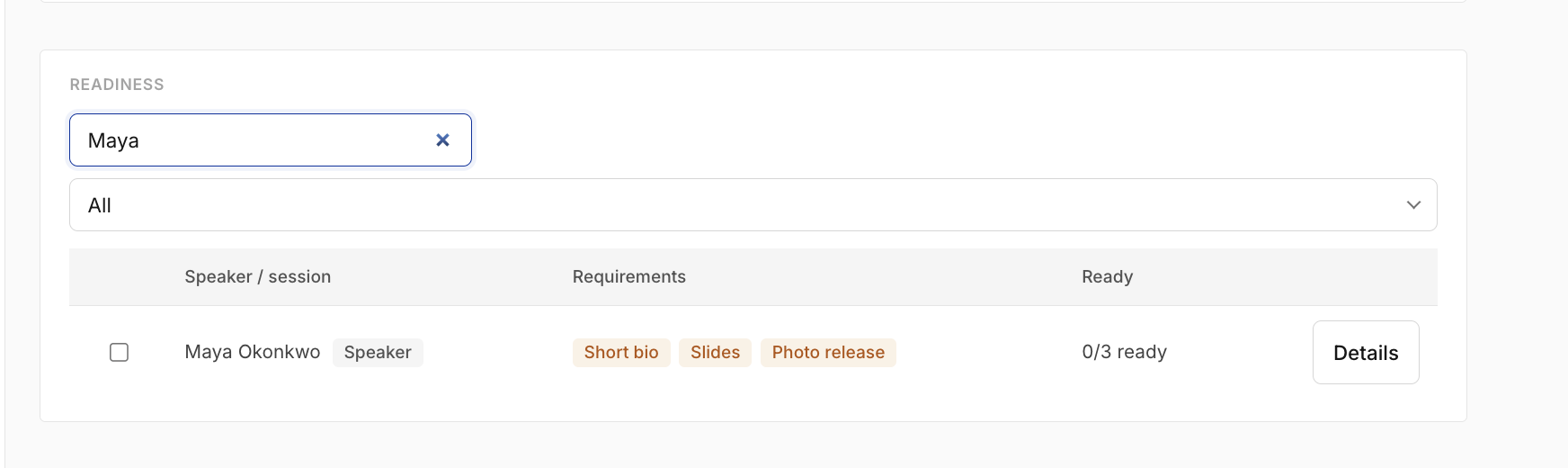
  • Exceptions, not a roll call. You open the view to the presenters who still owe a bio, a deck, or a signature — and skip everyone who is done.
  • Every action lands in an audit trail. Invite, reminder, approval, change request — a committee can see who did what, and when.
  • Approval can be the last step. Approved decks and links can appear on the agenda for attendees, one toggle per submission.
Readiness dashboard: every presenter at a glance

See it live in the demo →

What it replaces

The honest list

  • The spreadsheet. The tracker with a chased column is the dashboard now.
  • The mail merge. The reminder is written once, in the product, and sent on the cadence.
  • The shared drive folder. Files land on the presenter, not in a folder named after last year’s event.
  • Your memory. Who you nudged on Tuesday does not have to live in your head.

The concierge service

Want it done with you?

The software is already in your plan. This is my time: rates on the page, by scale, no quote gate.

We map your data, build your templates, send the invites, and stay hands-on through your event — direct founder support.

  • Community & small events · Community conferences, PD days, talk showcases — under 50 attendees — $150
  • Community & small events · 50–150 attendees — $350
  • Standard concierge · 150–500 attendees — $750
  • Large or complex · 500+ attendees, multi-track associations — from $1,250, individually scoped

Limits, stated plainly

What it will not do

It will not write the bios

Presenters still write. We collect, remind, and show you what’s missing.

Portal links expire after 30 days, or until a week after the event ends, whichever is later

A fresh link is one click. Older links keep working until their own expiry — a reminder does not revoke last week’s email.

Reminders are polite, not enforcement

Three moments: 7 days out, 2 days out, and once if overdue. Nobody is locked out for being late.

The two months before your event, without the chasing.

Create your event and switch Readiness on under Features. Want it done with you? Tell me your attendee count and event date and I'll reply.